 The Modest Goose
I don’t particularly want another subscription to help me manage my subscriptions. And I don’t think a budgeting tool should need a meeting with my bank before it can be useful.
For many of us, the job is simply to understand where the money went and whether we’re gradually getting stronger financially. A spreadsheet can do that very well. An app can be better if you need automatic transactions or reminders. The question is what the convenience is actually worth to you.
Why a plain spreadsheet appeals to me
A spreadsheet lets you build a financial model around your actual circumstances. You can include multiple currencies, an annual bonus, home purchase assumptions, irregular bills and scenarios for changing jobs. You decide how to classify money rather than hoping an automated category understands why a transfer appeared in your bank account.
A local Excel workbook can also be kept offline if you choose. Google Sheets stores the file in the cloud and requires attention to sharing settings. Neither approach automatically guarantees privacy; device security, backups and permissions still matter. The important distinction is that a manually maintained sheet need not have ongoing access to your banking credentials or transaction feed.
When automation is worth the trouble
If manual data entry makes you abandon your budget after two weeks, an app that reliably imports transactions may be worth the cost. Shared budgeting, alerts, mobile capture and frequent spending feedback can also matter. Compare the actual features and terms of the app rather than assuming every product connects to banks or follows the same privacy model.
A small subscription over two years
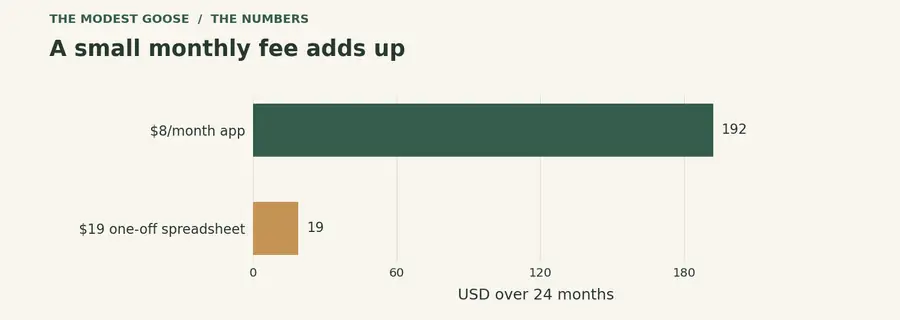
Imagine an app that costs $8 a month, and a one-off spreadsheet that costs $19. Assume the software needed to open it is already available, and ignore future pricing changes.
After 24 months, the app has cost $8 × 24 = $192. The one-off spreadsheet costs $19, so the difference is $173.
I wouldn’t make a decision about software over $173 alone. If the app saves you a few hours a month and you really use the features, that might be money very well spent. If the recurring fee is merely buying a prettier version of information you can collect in twenty minutes, the spreadsheet begins to look quite appealing.
But if the sheet takes an extra 15 minutes a month to maintain, that is six additional hours over two years. The saving works out to roughly $28.83 per extra hour of effort. Whether that is worthwhile depends on your preferences and whether the app produces useful information. The $8 is hypothetical, not a quote for a specific app.
Start with the least complicated arrangement
List what you actually want to know. If it is simply how much you spent on restaurants last week, transaction-level automation may be useful. If the question is whether you can afford a career break next year, a cash forecast and balance sheet may be more useful.
A hybrid setup can work too: export transaction summaries from an existing app and use a spreadsheet for planning. There is no prize for keeping every part of your financial life in one tool if a combination works better.
The questions a financial tool ought to answer
Before choosing an app or building a spreadsheet, I would write down the three or four questions I regularly ask about my finances. For example: am I saving enough to meet my goals, how much cash will I have in six months, how concentrated are my investments, and what happens if my bonus is lower than expected?
Those questions are quite different from asking how much you spent yesterday. An automatic transaction feed may be excellent at recording the past, while a well-designed spreadsheet may give you more control over the assumptions you use to model the future. Some applications provide both capabilities. The important part is evaluating the relevant feature rather than treating one category of product as universally superior.
A useful way to compare tools is to run the same ordinary task through both. Try entering an irregular annual insurance payment, changing the expected date of a bonus or estimating the effect of a salary reduction. Then check how easily you can see the assumptions and the resulting cash balance. If the tool makes that kind of change difficult, it may not fit the way you want to manage your money.
How much manual work is reasonable?
It can be, particularly if you insist on entering every individual transaction from every account. But that is not a requirement for every financial question. If you want a useful monthly cash-flow report, you may be able to work with category totals from your statements and a small number of adjustments for transfers or credit card payments. If you want to understand a particular spending problem, temporarily tracking that category in more detail may be worthwhile.
I would keep the process as short as possible while still being able to reconcile the results. Make a list of the accounts you need to check, update them on a consistent date and record the important figures in one place. When the closing cash balance differs from the expected balance, investigate the difference before drawing conclusions. There is no need to turn a modest monthly review into a second job.
If you find yourself abandoning the spreadsheet because the update process is too cumbersome, simplify it. Perhaps you have too many categories or are trying to track several measures that all tell you essentially the same thing. Or perhaps a good application really would make the process easier. The goal is maintaining useful financial information, not proving that manual entry is a virtue.
Your financial information is worth protecting
Bank-linking arrangements vary by provider and jurisdiction. Some services use regulated account-information connections, while others rely on different methods. The relevant questions are what information the service can access, how it is stored, whether access can be revoked, what happens when the account is closed and what data can be exported.
I would also check how easily you can take your information somewhere else. A simple tabular format can be useful because you can retain old records and continue to work with them even if you change tools. That is a meaningful advantage for something you expect to maintain for years. You do not necessarily need to commit to one approach forever. Start with the tool that answers your immediate questions, and change it if your requirements change. The right system should make the decisions easier rather than create a new set of decisions about the system itself.
A tool is worth keeping if it makes the financial decisions easier. Whether it has a lovely interface, a premium plan or a charming little animation when you save money is rather further down my list.
Education only, not financial advice. This article is general information, not a recommendation to buy, sell or hold anything. Examples are illustrative. Check current rules for your country, and consider a licensed adviser for decisions about your own situation. Full disclaimer.