 The Modest Goose
Why I Don't Need Another Productivity App
The most enjoyable part of a new productivity app is sometimes the afternoon spent setting it up. You pick a theme, make a beautiful dashboard and briefly become a person with a very orderly life. Then Monday arrives and there is still a leaking tap to fix.
I have nothing against the apps themselves. I just think the time spent maintaining a system deserves the same scrutiny as the time it claims to save. For a lot of personal work, a calendar and a decent list are surprisingly capable.
Why the system keeps expanding
Every new tool introduces another place to check and another system to maintain. If tasks live in an email inbox, a chat app, a paper notebook and two different task managers, the main job becomes remembering where you wrote something down.
This is not an argument against software. It is an argument for having a clear role for each tool. A calendar handles things that happen at a specific time. A task list handles actions you need to remember. Notes store information that is not itself a commitment. Mixing the three is often what makes a simple week feel complicated.
The 56-hour administrative hobby
Suppose a person spends 10 minutes each workday copying tasks among three tools and reconciling lists. They also spend 20 minutes every Friday reorganising their setup.
Ten minutes each day for five days plus twenty minutes on Friday is seventy minutes a week. Over 48 weeks that’s 3,360 minutes, or 56 hours.
Imagine using a setup that takes twenty minutes a week to maintain instead. You would spend 16 hours on it in the same period and get back 40 hours. That’s about a working week. I would not mind having that week back, particularly if I wasn’t doing much of value in those hours in the first place.
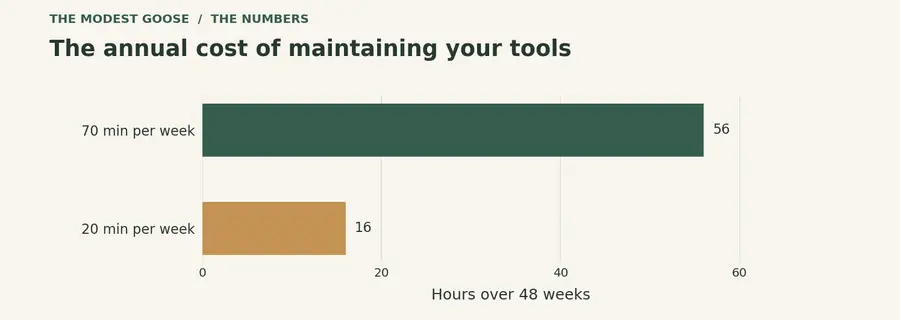
A simpler system requiring 20 minutes of weekly maintenance would use 16 hours over the same period. The hypothetical difference is 40 hours a year. That does not establish that every app wastes time; it shows why the cost of maintaining a system deserves attention.
A calendar, a list and somewhere for notes
Choose one place for every active task. Give it a project, a status and a real deadline where needed. Use the calendar for appointments and blocks of work that actually require reserved time. At the end of each week, review what is open, what is waiting on someone else and what no longer matters.
The test is whether you can answer three questions quickly: what needs attention today, what am I waiting for, and what have I promised but not scheduled? If you can, your system is probably doing its job. If you cannot, another clever feature may not be the answer.
The features that might justify a real app
A mobile reminder, recurring tasks, shared team workflows or integrations may genuinely save time. If your work requires frequent collaboration, a spreadsheet may be less convenient. Use the tool that reduces friction for the actual workflow rather than buying an app because the interface looks productive.
Name the problem before shopping for the solution
I would begin with a particularly ordinary question: what is going wrong with the current arrangement? Perhaps you forget tasks while away from your computer. Perhaps you cannot see upcoming deadlines across several projects. Or perhaps you have a perfectly good list but no regular routine for reviewing it. These are different problems and may call for different solutions.
If the issue is capturing commitments, a quick mobile note or a task manager with convenient entry might help. If the issue is seeing the combined workload, a spreadsheet with due dates and time estimates may be enough. If the issue is that nobody reviews the list, migrating it to a prettier interface may accomplish very little.
Before changing tools, describe the intended improvement in practical terms. For example, you want to be able to capture a task within ten seconds, see everything due this week in one view or avoid copying commitments between two systems. You can then evaluate whether the new arrangement actually does that. Without a specific purpose, it is rather easy to confuse the novelty of a new system with a lasting improvement.
Close the competing lists
Make an inventory of the places where commitments currently live. Your calendar may contain appointments, your email may contain requests, and a notebook may contain personal errands. You do not have to move every piece of information into one tool. You do need a reliable way of seeing the actions that require your attention.
Select a primary place for active personal tasks. If an email contains an action, record the action there and retain a reference to the email if you need the details. If an appointment requires preparation, create a task for the preparation rather than assuming the calendar event will remind you early enough. The original information can stay where it belongs.
Next, remove fields and categories that you rarely use. A task with a clear description, relevant due date and status can be very useful without a dozen additional labels. If you frequently need to group work by project or estimate the time involved, retain those fields. If you have no idea why a particular property exists, it probably does not deserve a permanent place in the system.
Add complexity only when it earns its place
A simple arrangement does not have to remain simple at all costs. If you begin managing a collaborative project or need recurring reminders in several locations, additional software may be justified. The advantage of starting small is that you can identify the actual limitation rather than buying a tool in anticipation of requirements you may never have.
If you do migrate tools, decide what will happen to the previous system. Export information you need to retain, move active commitments deliberately and stop maintaining the old list. Running two competing systems indefinitely is often the least convenient outcome. Where work information is involved, follow the appropriate organisational policies rather than copying confidential details into a personal account.
For individual planning, a spreadsheet remains a reasonable option, particularly if you already work in Excel.
If your new system helps you remember commitments and gets out of the way, keep it. If it gives you another dashboard to polish, perhaps what you needed was not a new app but a slightly shorter list.
General information. This article shares ideas and examples for organising work and life. It is not professional advice. Full disclaimer.