 The Modest Goose
How to Manage Multiple Projects in Excel
A home renovation, a course and a personal website can all be perfectly manageable projects. They become slightly less manageable when they all assume they’ll have exclusive use of the same six hours on Saturday.
This is why I like managing multiple personal projects in one Excel workbook. Not because every hobby needs project reporting, but because the same person is responsible for doing the work. It helps to see the competing claims on your time before committing to all of them.
Two sheets, not a reporting department
Start with two sheets. The Projects sheet records a project ID, name, intended outcome, target date and status. The Tasks sheet records each next action, its project ID, due date, status and estimated minutes. Keep project IDs consistent so that formulas and filters refer to the right project.
A master list avoids maintaining separate copies of the same task. If a detailed project requires additional notes, keep those on a separate sheet or in a document linked from the summary. Do not turn the master tracker into a place for every piece of supporting information.
Nine and a half hours of work in a six-hour week
Suppose the Tasks sheet uses column B for project ID, E for status and F for estimated minutes. On the Projects sheet, column A contains the project ID. The following formula totals unfinished estimated minutes for that project: =SUMIFS(Tasks!F:F,Tasks!B:B,A2,Tasks!E:E,"<>Done"). It includes waiting tasks, so use an additional condition to exclude them if you want only immediately actionable effort.
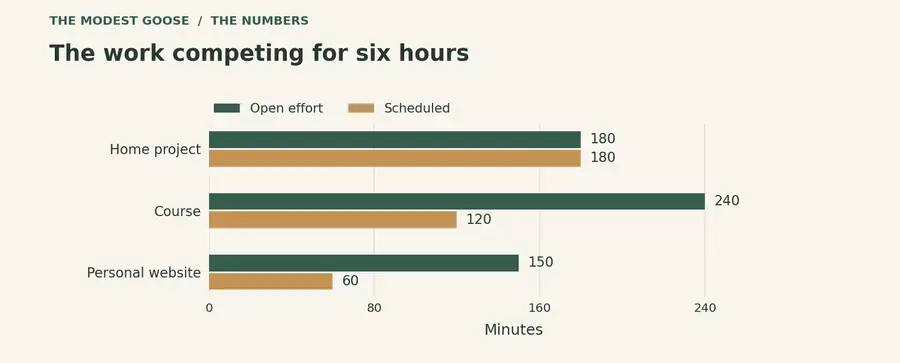
Suppose a home project has 180 minutes of open work, a course has 240 and a personal website has 150. You have six hours available this week.
The three projects have 180 + 240 + 150 = 570 minutes of work outstanding. There are 360 minutes available. That’s a shortfall of 210 minutes, or three and a half hours.
Suppose the house project really does need all 180 minutes. Give the course 120 and the website 60, for 360 minutes in total. The unfinished work is still in the workbook, but it is no longer pretending to be a realistic promise for this week.
The project summary I would keep
I would show project status, the next meaningful milestone, the next action and an indication of any blocked work. A percentage based on tasks completed is occasionally useful, but it can be misleading when tasks vary in size. Completing nine tiny tasks out of ten does not necessarily mean a project is 90% finished.
Review project priorities weekly. If an important project has no actionable task, identify the missing step. If a project has been paused, mark it clearly rather than keep its original deadlines appearing overdue every day.
One view of the coming week
Once your master task list is in place, the next useful step is to see which actions require attention during the same period. Filter for open items due during the coming week and sort by date. If the selected tasks include more effort than you have available, check which deadlines are genuinely fixed and which planned dates can be changed.
For example, if your Tasks worksheet uses column C for due date, column E for status and column F for estimated minutes, the following formula can total open effort due today through the next six days: =SUMIFS(Tasks!F:F,Tasks!C:C,">="&TODAY(),Tasks!C:C,"<"&TODAY()+7,Tasks!E:E,"<>Done"). This deliberately excludes earlier overdue items, so review them separately. Make sure dates are stored as Excel date values and estimated effort is numeric. If waiting items are included, the result represents open work rather than necessarily actionable work.
A weekly view is useful because a project can look entirely manageable when considered on its own. The difficulty becomes apparent only when several projects need time during the same week. A combined estimate helps you discover that problem before promising to meet every date.
Don’t hide work that is waiting on someone else
A project may remain open even when there is nothing you can currently do. Perhaps a contractor needs to send a quote, a colleague is reviewing a document or an organisation has yet to confirm an appointment. If these items are mixed into the list of immediately actionable work, they can make the planned workload look larger than it really is.
Create a waiting status and record what needs to happen before the next action can begin. Where appropriate, include a follow-up date. This is particularly helpful for projects with several dependencies because it makes clear whether the next useful action is performing the work or obtaining the information required to perform it.
A separate project summary can also identify the next significant milestone. A home project might have a milestone of receiving the final quotations, while a course might have a milestone of completing an assessment. Not every task needs to be on the critical path, meaning the sequence of work that determines when the project can finish. For smaller projects, simply identifying what is blocking the next milestone is often sufficient.
Keep it proportionate to the actual projects
I would make the workbook more detailed only when the extra information improves a decision. A complex renovation may warrant a budget, a schedule and a record of important agreements. A small household errand may need only a date and a next action. Putting both into a system with identical reporting requirements can make the simple task unnecessarily expensive to manage.
Separate the supporting records from the master list. Retain the detailed documents for each project in an appropriate location, and use references if you need to find them from the tracker. This keeps the main workbook focused on the decisions you make regularly: what needs attention, what is waiting and what can reasonably be scheduled.
At the end of a week, review projects that have received no attention. Sometimes this means they have been intentionally paused, which is entirely reasonable. Sometimes it reveals a lack of capacity or an unclear next action. Update the status to reflect the actual situation rather than leave every project marked as active indefinitely.
You can build the two-sheet structure above yourself.
A good project tracker lets you see the real trade-off before the weekend arrives. If your course, house and website all need attention, at least give them an appointment in the same reality.
General information. This article shares ideas and examples for organising work and life. It is not professional advice. Full disclaimer.