 The Modest Goose
Why Your To-Do List Keeps Getting Longer
Few things are more dispiriting than working hard all week and finishing Friday with a longer to-do list than you had on Monday. You have demonstrably been doing things. Unfortunately, the things appear to be breeding.
A task backlog is simply the work that remains. If you add more tasks than you finish or remove, the backlog grows, regardless of how industrious you feel. I think this is a more useful starting point than downloading another productivity technique.
The arithmetic behind the growing list
There are two common reasons: tasks arrive continuously, and old tasks rarely leave unless they are completed. If you keep every idea, vague ambition and low-priority chore alongside actual commitments, the list becomes a record of everything you might conceivably do rather than a plan.
Some tasks also hide multiple actions. ‘Sort out the move’ may involve booking viewings, reviewing finances, arranging transport and speaking to several people. Counting it as one small task disguises the effort required.
The Monday-to-Friday task count
Suppose you start Monday with 25 active tasks. During the week, you capture 14 new commitments, complete nine and remove two that are no longer relevant.
We started with 25 tasks. Fourteen arrived, nine were completed and two turned out not to matter. Friday’s balance is 25 + 14 − 9 − 2 = 28.
The nine completions weren’t a failure. They just couldn’t keep up with the arrival rate. If the following week looks similar, work on reducing what enters the list as well as getting items off it. You can’t keep bailing out the boat while enthusiastically adding more water.
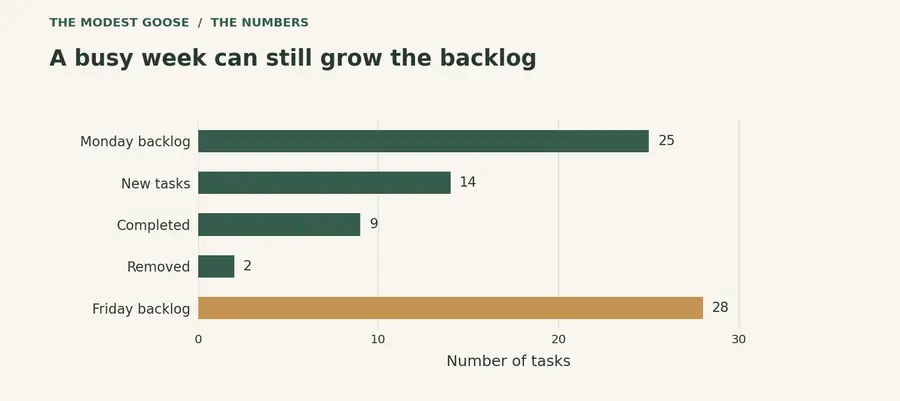
If this pattern continues, the list grows by three tasks a week. You could work perfectly diligently and still end up with 40 active tasks a month later. Task counts are a rough measure because effort varies, so also compare estimated hours of incoming and completed work.
Stop the list from becoming a second job
Maintain three distinct areas: active commitments, waiting items and a backlog of possible projects. A backlog is not a promise. Move ideas into the active list only when you decide to spend time on them. Mark waiting items with the person or event you are waiting for, so they do not repeatedly compete for attention.
Look at tasks that have been postponed several times. If a task matters, make the next action clearer and reserve time. If it doesn’t, remove it or put it in the backlog. An honest decision not to do something is progress of a different kind.
How many tasks should really be active?
There is no magic count. A person with ten large tasks can be far more overloaded than someone with thirty small ones. I would estimate the effort required for commitments due over the next week and compare it with available hours. Add a buffer for interruptions rather than scheduling every minute.
If the plan consistently exceeds your capacity, the solution may be renegotiating deadlines or reducing scope. Another colour-coded urgency label will not create an extra afternoon.
An idea isn’t a commitment
I would keep a separate place for ideas that you have not committed to. It can be a second tab in the same workbook. The important distinction is that an idea in that tab does not count towards the work you are trying to complete this week. Review it when you have a reason to choose a new project, rather than treating the whole collection as a permanent source of overdue tasks.
An active commitment should normally have a clear next action and an identifiable reason to do it. If the task has no deadline and no meaningful consequence of delay, decide whether it is something you genuinely intend to prioritise. There is nothing wrong with leaving a useful idea in the backlog until circumstances are more suitable.
Some tasks are actually entire projects
A task count is particularly misleading when some entries represent five-minute errands and others represent entire projects. Completing a few small tasks may make the list look healthier without addressing the work that actually requires most of your time. Conversely, one substantial project milestone might take an afternoon and represent far more progress than clearing ten routine items.
Add rough time estimates to the tasks where effort matters. You do not need to estimate every email to the nearest minute. A few practical categories, such as under fifteen minutes, around half an hour and more than an hour, can be enough to identify work that needs a dedicated session. For a larger commitment, break it into actions that can actually fit the available time.
Also look for tasks that have been repeatedly postponed because they are unclear. ‘Deal with tax’ is a large and rather uninviting entry. ‘Download the relevant tax documents’ is a more concrete first step. Once that action is finished, you can identify the next one. A list of clear actions is easier to manage than a list of vaguely defined problems.
The neglected skill of saying no
Sometimes the backlog cannot be solved from the completion side alone. Look at the kinds of commitments you keep adding. Are you agreeing to new projects without checking existing obligations? Are you repeatedly creating tasks because a routine has no clear owner or scheduled time? Are you keeping optional improvements active even though more important work is already waiting?
Before agreeing to something new, check the combined workload. If the new commitment is important, decide which existing work will be postponed or reduced. This is particularly useful for shared household responsibilities and side projects, where the consequences of accepting too much may not be immediately obvious.
For recurring tasks, establish a simple routine instead of repeatedly rediscovering them. A monthly financial review, for example, can be a standing commitment rather than a collection of unrelated reminders. Similarly, a scheduled follow-up date can prevent you from checking a waiting item every day. These changes reduce administrative effort without pretending that the underlying work has disappeared.
Start with a simple master list.
You don’t need to finish everything on your list to have a good week. You need a list that contains work you actually intend to do. Sometimes the most productive thing you can do to it is delete something.
General information. This article shares ideas and examples for organising work and life. It is not professional advice. Full disclaimer.